



Virtual Threads in Java – Deep Dive with Examples

 June 14, 2022
Virtual threads are one of the most important innovations in Java in a long time. They were developed in Project Loom and have been included in the JDK since Java 19 as a preview feature and since Java 21 as a final version (JEP 444).
In this article, you will learn:
- Why do we need virtual threads?
- What are virtual threads, and how do they work?
- How do you use virtual threads?
- How do you create virtual threads, and how many virtual threads can be started?
- How do you use virtual threads in Spring and Jakarta EE?
- What are the advantages of virtual threads?
- What are virtual threads not, and what are their limitations?
Let's start with the challenge that led to the development of virtual threads.
Why Do We Need Virtual Threads?
Anyone who has ever maintained a backend application under heavy load knows that threads are often the bottleneck. For every incoming request, a thread is needed to process the request. One Java thread corresponds to one operating system thread, and these are resource-hungry:
- An OS thread reserves 1 MB for the stack and commits 32 or 64 KB of it upfront, depending on the operating system.
- It takes about 1 ms to start an OS thread.
- Context switches take place in kernel space and are quite CPU-intensive.
You should not start more than a few thousand; otherwise, you risk the stability of the entire system.
However, a few thousand are not always enough – especially if it takes longer to process a request because of the need to wait for blocking data structures, such as queues, locks, or external services like databases, microservices, or cloud APIs.
For example, if a request takes two seconds and we limit the thread pool to 1,000 threads, then a maximum of 500 requests per second could be answered. However, the CPU would be far from fully utilized since it would spend most of its time waiting for responses from the external services, even if several threads are served per CPU core.
So far, we have only been able to overcome this problem with asynchronous programming – for example, with CompletableFuture or reactive frameworks like RxJava and Project Reactor.
However, anyone who has had to maintain code like the following knows that asynchronous code is many times more complex than sequential code – and absolutely no fun.
public CompletionStage<Response> getProduct(String productId) {
   return productService
         .getProductAsync(productId)
         .thenCompose(
            product -> {
               if (product.isEmpty()) {
                  return CompletableFuture.completedFuture(
                        Response.status(Status.NOT_FOUND).build());
               }

               return warehouseService
                     .isAvailableAsync(productId)
                     .thenCompose(
                           available ->
                                 available
                                       ? CompletableFuture.completedFuture(0)
                                       : supplierService.getDeliveryTimeAsync(
                                             product.get().supplier(), productId))
                     .thenApply(
                           daysUntilShippable ->
                                 Response.ok(
                                       new ProductPageResponse(
                                             product.get(), daysUntilShippable))
                                       .build());
               });
}Code language: Java (java)
Not only is this code hard to read and maintain, but it is also extremely difficult to debug. For example, it would make no sense to set a breakpoint here because the code only defines the asynchronous flow but does not execute it. The business code will be executed in a separate thread pool at a later time.
In addition, the database drivers and drivers for other external services must also support the asynchronous, non-blocking model.
What Are Virtual Threads?
Virtual threads solve the problem in a way that again allows us to write easily readable and maintainable code. Virtual threads feel like normal threads from a Java code perspective, but they are not mapped 1:1 to operating system threads.
Instead, there is a pool of so-called carrier threads onto which a virtual thread is temporarily mapped (“mounted”). As soon as the virtual thread encounters a blocking operation, the virtual thread is removed (“unmounted”) from the carrier thread, and the carrier thread can execute another virtual thread (a new one or a previously blocked one).
The following figure depicts this M:N mapping from virtual threads to carrier threads and thus to operating system threads:
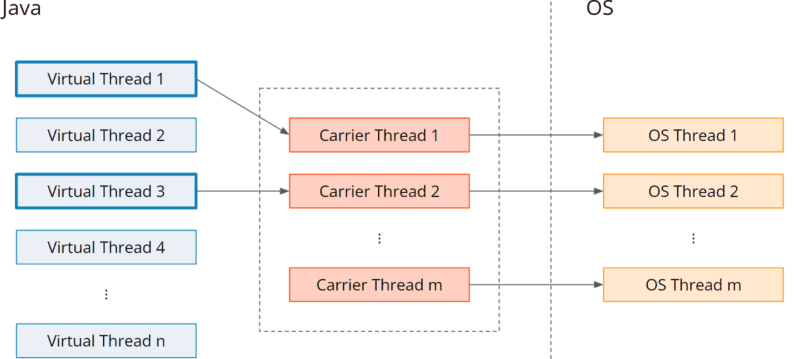
The carrier thread pool is a ForkJoinPool – that is, a pool where each thread has its own queue and “steals” tasks from other threads' queues should its own queue be empty. Its size is set by default to Runtime.getRuntime().availableProcessors() and can be adjusted with the VM option jdk.virtualThreadScheduler.parallelism.
Over the course of time, the CPU activity of three tasks, for example, each executing code four times and blocking three times for a relatively long period in between, could be mapped to a single carrier thread as follows:

Blocking operations thus no longer block the executing carrier thread, and we can process a large number of requests concurrently using a small pool of carrier threads.
We could then implement the example use case from above quite simply like this:
public ProductPageResponse getProduct(String productId) {
    Product product = productService.getProduct(productId)
            .orElseThrow(NotFoundException::new);

    boolean available = warehouseService.isAvailable(productId);

    int shipsInDays =
        available ? 0 : supplierService.getDeliveryTime(product.supplier(), productId);

    return new ProductPageResponse(product, shipsInDays);
}Code language: Java (java)
This code is not only easier to write and read but also – like any sequential code – to debug by conventional means.
If your code already looks like this – i.e., you never switched to asynchronous programming, then I have good news: you can continue to use your code unchanged with virtual threads.
Virtual Threads – Example
We can also demonstrate the power of virtual threads without a backend framework. To do this, we simulate a scenario similar to the one described above: we start 1,000 tasks, each of which waits one second (to simulate access to an external API) and then returns a result (a random number in the example).
First, we implement the task:
public class Task implements Callable<Integer> {

    private final int number;

    public Task(int number) {
        this.number = number;
    }

    @Override
    public Integer call() {
        System.out.printf("Thread %s - Task %d waiting...%n",
                Thread.currentThread().getName(), number);

        try {
            Thread.sleep(1000);
        } catch (InterruptedException e) {
            System.out.printf("Thread %s - Task %d canceled.%n",
                    Thread.currentThread().getName(), number);
            return -1;
        }

        System.out.printf("Thread %s - Task %d finished.%n",
                Thread.currentThread().getName(), number);
        return ThreadLocalRandom.current().nextInt(100);
    }
}Code language: Java (java)
Now we measure how long it takes a pool of 100 platform threads (which is how non-virtual threads are referred to) to process all 1,000 tasks:
try (ExecutorService executor = Executors.newFixedThreadPool(100)) {
    List<Task> tasks = new ArrayList<>();
    for (int i = 0; i < 1_000; i++) {
        tasks.add(new Task(i));
    }

    long time = System.currentTimeMillis();

    List<Future<Integer>> futures = executor.invokeAll(tasks);

    long sum = 0;
    for (Future<Integer> future : futures) {
        sum += future.get();
    }

    time = System.currentTimeMillis() - time;

    System.out.println("sum = " + sum + "; time = " + time + " ms");
}Code language: Java (java)The program runs for a little over 10 seconds. That was to be expected:
1,000 tasks divided by 100 threads = 10 tasks per thread
Each platform thread had to process ten tasks sequentially, each lasting about one second.
Next, we test the whole thing with virtual threads. Therefore, we only need to replace the statement
Executors.newFixedThreadPool(100)Code language: Java (java)with:
Executors.newVirtualThreadPerTaskExecutor()Code language: Java (java)This executor does not use a thread pool but creates a new virtual thread for each task.
After that, the program no longer needs 10 seconds but only just over one second. It can hardly be faster because every task waits one second.
Impressive: even 10,000 tasks can be processed by our little program in just over a second.
Only at 100,000 tasks does the throughput drop noticeably: my laptop needs about four seconds for this – which is still blazingly fast compared to the thread pool, which would need almost 17 minutes.
How Do You Create Virtual Threads?
We have already learned about one way to create virtual threads: An executor service that we create with Executors.newVirtualThreadPerTaskExecutor() creates one new virtual thread per task.
Using Thread.startVirtualThread() or Thread.ofVirtual().start(), we can also explicitly start virtual threads:
Thread.startVirtualThread(() -> {
    // code to run in thread
});

Thread.ofVirtual().start(() -> {
    // code to run in thread
});Code language: Java (java)
With the second variant, Thread.ofVirtual() returns a Thread.Builder.OfVirtual whose start() method starts a virtual thread. The alternative method Thread.ofPlatform() returns a Thread.Builder.OfPlatform, which you can use to start a platform thread.
Both are subinterfaces of Thread.Builder. This lets you write flexible code that decides only at runtime whether it should run in a virtual or a platform thread:
Thread.Builder threadBuilder = createThreadBuilder();
threadBuilder.start(() -> {
    // code to run in thread
});Code language: Java (java)
By the way, you can find out if code is running in a virtual thread with Thread.currentThread().isVirtual().
How Many Virtual Threads Can Be Started?
In this GitHub repository you can find several demo programs that demonstrate the capabilities of virtual threads.
With the class HowManyVirtualThreadsDoingSomething you can test how many virtual threads you can run on your system. The application starts more and more threads and performs Thread.sleep() operations in these threads in an infinite loop to simulate waiting for a response from a database or an external API. Try to give the program as much heap memory as possible with the VM option -Xmx.
On my 64 GB machine, 20,000,000 virtual threads could be started without any problems – and with a little patience, even 30,000,000. From then on, the garbage collector tried to perform full GCs non-stop – because the stack of virtual threads is “parked” on the heap, in so-called StackChunk objects, as soon as a virtual thread blocks. Shortly after, the application terminated with an OutOfMemoryError.
With the class HowManyPlatformThreadsDoingSomething you can also test how many platform threads your system supports. But be warned: Most of the time the program ends with an OutOfMemoryError at some point (between 80,000 and 90,000 threads for me) – but it can also crash your computer.
How Do You Use Virtual Threads with Jakarta EE?
In a Jakarta EE application, you don't create threads yourself – you leave that to the container. Since Jakarta EE 11 (Jakarta Concurrency 3.1), you can request that a managed executor or a managed thread factory use virtual threads. To do so, you set the attribute virtual = true, for example on a @ManagedExecutorDefinition:
@ManagedExecutorDefinition(
        name = "java:app/concurrent/virtualExecutor",
        virtual = true)Code language: Java (java)
The same attribute is available on @ManagedScheduledExecutorDefinition and @ManagedThreadFactoryDefinition. You then inject the executor defined this way and run your tasks through it. By default, virtual is set to false – so the container keeps creating platform threads until you explicitly enable virtual threads.
In standard Jakarta EE (as of Jakarta EE 11), however, you can't place a single REST endpoint directly on a virtual thread via an annotation. That's exactly what the Quarkus/SmallRye ecosystem offers with the @RunOnVirtualThread annotation – more on that in the next section.
How Do You Use Virtual Threads with Quarkus?
Quarkus offers the @RunOnVirtualThread annotation. It comes from SmallRye Common (io.smallrye.common.annotation.RunOnVirtualThread) and is – as of today – not part of the Jakarta EE specification. With it, you place a single endpoint on a virtual thread:
@GET
@Path("/product/{productId}")
@RunOnVirtualThread
public ProductPageResponse getProduct(@PathParam("productId") String productId) {
    Product product = productService.getProduct(productId)
            .orElseThrow(NotFoundException::new);

    boolean available = warehouseService.isAvailable(productId);

    int shipsInDays =
        available ? 0 : supplierService.getDeliveryTime(product.supplier(), productId);

    return new ProductPageResponse(product, shipsInDays);
}Code language: Java (java)
You don't have to change a single character in the method body. Quarkus has supported @RunOnVirtualThread since version 2.10 – that is, since June 2022.
In this GitHub repository you will find a sample Quarkus application with the controller shown above – one with platform threads, one with virtual threads and also an asynchronous variant with CompletableFuture. The README explains how to start the application and how to invoke the three controllers.
How Do You Use Virtual Threads with Spring?
In Spring, the controller would look like this:
@GetMapping("/stage1-seq/product/{productId}")
public ProductPageResponse getProduct(@PathVariable("productId") String productId) {
    Product product = productService
            .getProduct(productId)
            .orElseThrow(() -> new ResponseStatusException(NOT_FOUND));

    boolean available = warehouseService.isAvailable(productId);

    int shipsInDays =
            available ? 0 : supplierService.getDeliveryTime(product.supplier(), productId);

    return new ProductPageResponse(product, shipsInDays);
}Code language: Java (java)
Since Spring Boot 3.2, a single property in application.properties is enough to run all request handlers on virtual threads:
spring.threads.virtual.enabled=trueCode language: Properties (properties)Spring Boot then configures, among other things, the web server (Tomcat/Jetty) and the task executor so that each request is handled in its own virtual thread.
Note: this makes all controllers run on virtual threads. For most use cases that's fine – but not for CPU-bound tasks, which should still run on platform threads.
In this GitHub repository you can find a sample Spring application with the controller shown above. The README explains how to start the application and how to switch the controller from platform threads to virtual threads.
Advantages of Virtual Threads
Virtual threads offer impressive advantages:
First, they are inexpensive:
- They can be created much faster than platform threads: it takes about 1 ms to create a platform thread, and less than 1 µs to create a virtual thread.
- They require less memory: a platform thread reserves 1 MB for the stack and commits 32 to 64 KB upfront, depending on the operating system. A virtual thread starts with about one KB. However, this is true only for flat call stacks. A call stack the size of half a megabyte requires that half megabyte in both thread variants.
- Blocking virtual threads is cheap because a blocked virtual thread does not block an OS thread. However, it's not free as its stack needs to be copied to the heap.
- Context switches are fast because they are performed in user space, not kernel space, and numerous optimizations have been made in the JVM to make them faster.
Second, we can use virtual threads in a familiar way:
- Only minimal changes have been made to the
ThreadandExecutorServiceAPIs. - Instead of writing asynchronous code with callbacks, we can write code in the traditional blocking thread-per-request style.
- We can debug, observe, and profile virtual threads with existing tools.
What Are Virtual Threads Not?
Virtual threads don't only have advantages, of course. Let's first look at what virtual threads are not, and what we cannot or should not do with them:
- Virtual threads are not faster threads – they cannot execute more CPU instructions than a platform thread in the same amount of time. If a task does not block, it will – due to the overhead of mounting/unmounting – run even slower on a virtual thread than on an existing platform thread from an
ExecutorService. - They are not preemptive: while a virtual thread is executing a CPU-intensive task, it is not unmounted from the carrier thread. So if you have 20 carrier threads and 20 virtual threads that occupy the CPU without blocking, no other virtual thread will be executed.
- They do not provide a higher level of abstraction than platform threads. You need to be aware of all the subtle things that you also need to be aware of when using regular threads. That is, if a virtual thread accesses shared data, you have to take care of visibility issues, you have to synchronize atomic operations, and so on.
What Limitations Do Virtual Threads Have?
You should be aware of the following limitations. The picture has eased considerably since their introduction in Java 21, though – some earlier limitations have since been lifted.
1. Unsupported Blocking Operations
The vast majority of blocking operations in the JDK have been rewritten to support virtual threads. One relevant exception remains (as of Java 26):
- File I/O
Here, a blocked virtual thread will also block the carrier thread. To compensate, the JVM temporarily increases the number of carrier threads – up to a maximum of 256, which you can adjust via the VM option jdk.virtualThreadScheduler.maxPoolSize. A solution (based on io_uring, among other things) is in the works.
2. Pinning
Pinning means that a blocking operation that would normally unmount a virtual thread from its carrier thread does not do so, because the virtual thread has been “pinned” to its carrier thread – meaning it isn't allowed to switch carrier threads.
As of Java 26, pinning only occurs when the call stack contains calls to native code – because we can't control what happens inside native code. Inside a synchronized block, on the other hand, a virtual thread no longer pins.
Detecting Pinning
You can detect remaining pinning (e.g. caused by native code) via the JDK Flight Recorder event jdk.VirtualThreadPinned, for example in a JFR recording. The event is recorded when a virtual thread blocks while it is pinned.
3. No Deadlock Detection in Thread Dumps
As of Java 25, the new thread dumps (via jcmd <pid> Thread.dump_to_file, see the next section) also contain information about locks held by virtual threads or that they are blocked on – for example the object monitor a thread is waiting to enter.
What these thread dumps still don't show are deadlocks between virtual threads or between a virtual and a platform thread. There is no automatic deadlock detection here as there is with classic thread dumps – you have to track down deadlocks yourself based on the lock information.
Thread Dumps with Virtual Threads
The conventional thread dumps printed via jcmd <pid> Thread.print do not contain virtual threads. The reason for that is that this command stops the VM to create a snapshot of the running threads. This is feasible for a few hundred or even a few thousand threads, but not for millions of them.
Therefore, a new kind of thread dump has been implemented that does not stop the VM (accordingly, the thread dump may not be internally consistent) but does include virtual threads in return. This new thread dump can be created with one of these two commands:
jcmd <pid> Thread.dump_to_file -format=plain <file>jcmd <pid> Thread.dump_to_file -format=json <file>
The first command generates a thread dump similar to the traditional one, with thread names, IDs and stack traces. The second command generates a file in JSON format that also contains information about thread containers, parent containers, and owner threads.
When Should You Use Virtual Threads?
You should use virtual threads if you have many tasks to be processed concurrently, which primarily contain blocking operations.
This is true for most server applications. However, if your server application handles CPU-intensive tasks, you should use platform threads for them.
What Else Should You Keep in Mind?
Here are a few tips on using and migrating to virtual threads:
- Even though many articles about virtual threads would have us believe otherwise, they do not inherently use less memory than a platform thread. This is only the case if the call stack is shallow. With deep call stacks, both types of threads consume the same amount of memory.
- Virtual threads do not need to be pooled. A pool is used to share expensive resources. Virtual threads, on the other hand, are so cheap that it is better to create one when you need it and let it terminate when you no longer need it.
- If you need to limit access to a resource, such as how many threads can access a database or API at the same time, use a semaphore instead of a thread pool.
- Much of the virtual thread code is written in Java. Accordingly, you must warm up the JVM before running performance tests so that all bytecode is compiled and optimized before the measurement begins.
Summary
Virtual threads deliver what they promise: they allow us to write readable and maintainable sequential code that does not block operating system threads when waiting for locks, blocking data structures, or responses from the file system or external services.
Virtual threads can be created in the order of millions.
Common backend frameworks such as Spring and Quarkus can already handle virtual threads. Nevertheless, you should test applications thoroughly when you flip the switch to virtual threads. Make sure that you do not, for example, execute CPU-intensive computing tasks on them, that they are not pooled by the framework, and that no ThreadLocals are stored in them (see also Scoped Values).
I hope you're as excited as I am and can't wait to use virtual threads in your projects!
If you still have questions, please ask them via the comment function.